Your round, read by an AI golf coach
Speak a few words after each hole. At the end of the round, Fourball turns those notes and your card into a proper coaching review — the clangers called out, a best-case score, and the three things worth practising.
Read a full sample review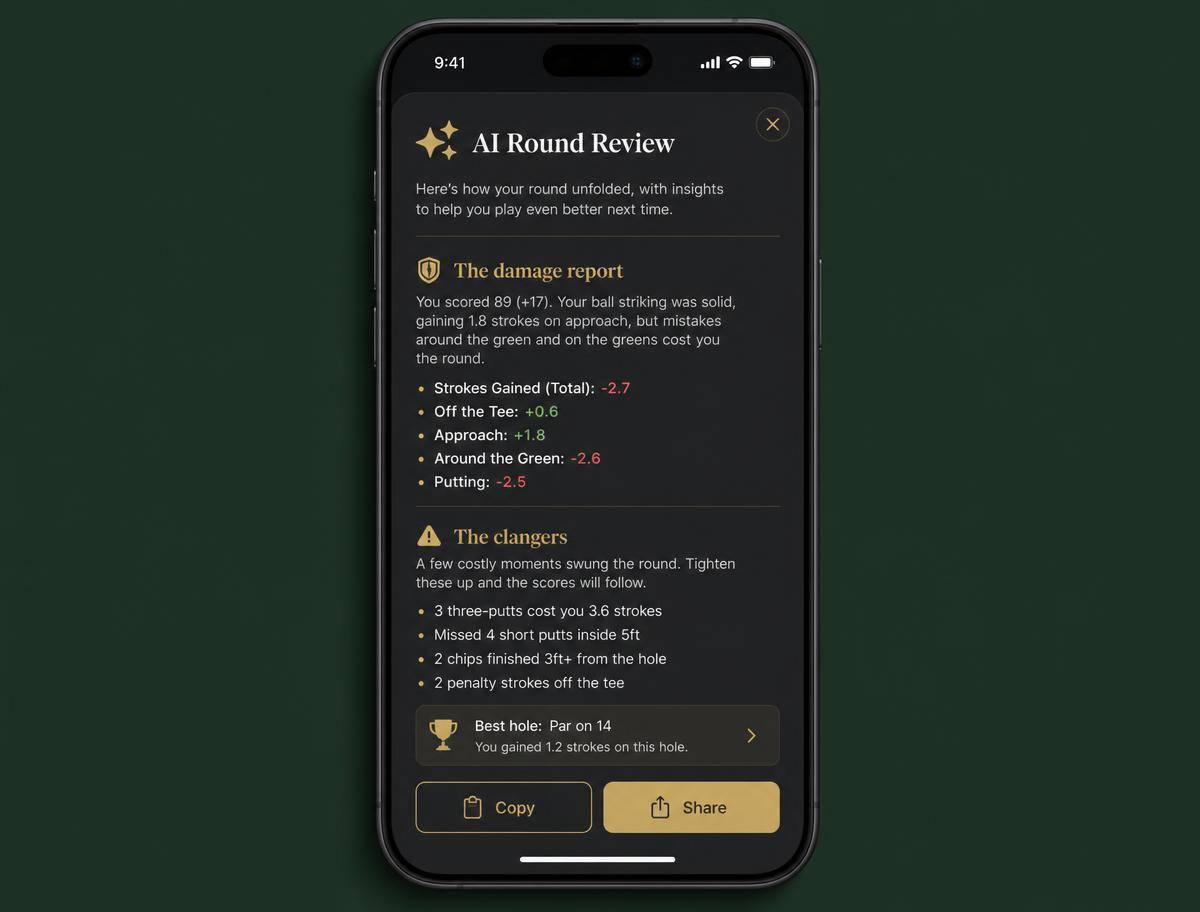
1. Recording a shot note
Every hole on your individual scorecard has a sparkle icon beside it. It is the only button you need.
- Tap once and talk. Recording starts immediately. Describe the hole the way you would to a playing partner: "A great drive, then an eight iron out of bounds."
- Green sparkle means it is saved. Tap again to review, re-record or clear it.
2. Prefer buttons to a microphone? Tap your clubs instead
Speaking your round is the fastest option, but it is not the only one. Every hole also has a crossed-clubs button that opens a simple tap-to-record dialog. Tap the clubs in the order you played them — Fourball counts the shots, counts the putts, and even sets the score for you. Add a penalty stroke with the red button if you visited the water.
A drive, an eight iron and two putts looks like this — four shots, two of them putts, all of it feeding straight into your AI review and stats:
- Green clubs mean it is saved. The button turns green once a hole has clubs recorded. Tap again to review, change or clear them.
- Mix and match. Speak some holes and tap others — the AI coach reads both exactly the same way.
3. What Fourball pulls out of your words
The recording is transcribed and then read by a language model that understands golf. From one sentence it extracts:
Clubs used
Every club you mention, in order. Drives are assumed to be a driver unless you say otherwise, and chips or pitches are assumed to be a pitching wedge.
Shot count
How many shots the note describes. If the hole was never holed out — an OB, a pick-up — the count is set to par plus three.
Putts
Counted separately so putting shows up in your stats and in the coaching review.
The score itself
If you have not entered a score for the hole yet, the count derived from your note is used as the score.
4. Getting the review
The AI badge sits beside each player's name on the leaderboard. It stays muted until that player has a score on every hole — a coach cannot review half a card. Tap it early and Fourball tells you how many holes are still outstanding.
Once the card is full, tap the badge and choose how you want it delivered:
The coach receives your handicap index, the shots you received today, and every hole with its par, stroke index, score, points and your shot note. Each review is stored against the round, player and tone — reopening it is instant and free, and there arecopy and share buttons in the dialog.
Where to find it
- Shot notes: individual scorecard → sparkle icon beside any hole.
- Club recording: scorecard → crossed-clubs icon beside any hole.
- Round review: leaderboard → AI badge beside a player's name (needs a full card).
- This guide: the round menu (gear icon, top-left during a round) → AI Round Analysis, or the main menu on any page.
A real example
91 gross off a 15.2 index (19 shots on the day) at a links course. Here is a sample of the notes recorded on the way round, and the review the coach produced from them.
Your stats
Shot notes recorded
| Hole | Par | Score | Clubs | Note |
|---|---|---|---|---|
| 1 | 4 | 6 | Driver, Lob Wedge, Putter ×3 | Decent drive, wedge came up short and then three putts from the front edge. |
| 2 | 4 | 7 | Driver, 8 Iron | A great drive, then an eight iron out of bounds. |
| 5 | 3 | 4 | 9 Iron, Pitching Wedge, Putter | Short right off the tee, pitched on and one putt. |
| 13 | 5 | 8 | Driver, 7 Iron, Sand Wedge ×3, Putter ×2 | Bunker, out sideways, back in the bunker, then another one. Disaster hole. |
| 18 | 4 | 5 | Driver, 6 Iron, Pitching Wedge, Putter | Good drive, missed the green right, decent chip and two putts. |
The review it generated
The damage report
Ninety-one gross off nineteen shots is a card that looks worse than the golf actually was. Strip out three holes and you are staring at a comfortable buffer round — which is precisely what makes it frustrating.
The clangers
Best case
Play those three holes to bogey — not par, just bogey — and you sign for 84 with 39 points. Nothing about that requires better ball striking. It requires better decisions.
Practice priorities
1. Bunker escapes. Twenty balls, one rule: out first time, anywhere on the grass.
2. Lag putting from 30-50 feet. Your three putts all came from long range.
3. Committed mid irons. Two of the three big numbers came from a defensive swing with an iron in hand.
Talk your way round, then get told the truth
Start a round, record a note on each hole, and see what the coach makes of it.
Start a round